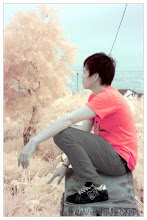
Tips usage of tool editing infra red photo
Photograph from result of camera infra red very on unique, many mans which confusion for problem process his(its digital, many people whoes at forum photography tells tool applied in photoshop only around image --> adjusment like channel mixer, selective colour, auto of level, curves, color balance, hue/saturation, etc..
Hopefully with this my postingan, you can develop it and more creatively again.
Hopefully useful.
Tips usage of tool editing infra red photo
tips easy to change background photograph
tips easy to change background photograph
1. photograph open is wishing selection you
2. applies polygonal lasso tool or magnetic lasso tool or compress L in keyboard
3. starts does selection, in the event of mistake of quit of selection or selection of line, you are compress backspace to return it.
4. after completed selection of compress V atu move tool and draws to background which you wishs.
5. having
hopefully useful
Tips makes photograph vintage / retro for beginner
1. your photograph open
2. duplicate layer by the way of CTRL + J
3. then opened CURVES / CTRL + M
4. arranges composition of colour as according to your will;desire, but channel applied only blue and red, that photograph is more having colourly vintage
5. after completed phase 4, now you are your photograph contact with grunge brush, that photograph bebercak and having nuance photograph which have been long enough.
6. save only. Having
hopefully useful
Tips makes simple frame in photoshop
1. your photograph open
2. duplicate your foto/layer by the way of CTRL + J
3. then double clicked in layer 1 ( result of duplicate)
4. after admission in layer style click inner glow
5. changes blend mode with NORMAL
6. opacity 100%
7. and element its(the choke 100%
8. then its(the size you liked you
9. click ok and having
hopefully useful
washs out of with photoshop for beginner
washs out of with photoshop for beginner
possibly plenty (of) way to clean face we are photographed, can apply healing tool, can also applies blur tool.
But sometimes we wish quickly in doing expurgation, now I am there are solution, only with a few clicked the you face in photograph thus spotless cleanness.
Its(the solution is download you 2 tool must be additional that is imagenomic noisware and imagenomic potraitue, with ke2 tool you are ga needs is hard difficultness to sweep one by one stain is face [by] you.
Hopefully useful
tips editing photograph manual infra red ( IR camera)
tips editing photograph manual infra red ( IR camera)
1. your IR photograph open
2. duplicate layer / CTRL + J
3. click Image – Adjusment – Channel mixer
4. this composition for Channel mixer – RED : red 0 green 0 blue 100 – BLUE : red 100 green 0 blue 0. OK
5. then CTRL + auto Levator Skapula and click of level, and result of his(its would like this
6. having, the rest up to you.
Hopefully useful.
Subscribe to:
Posts (Atom)